Email Template Design
DesignBub builds reusable HTML email template systems for marketing, ecommerce, lifecycle and transactional mail — modular layouts your team can reuse across campaigns, responsive on every screen, with optional coded implementation.

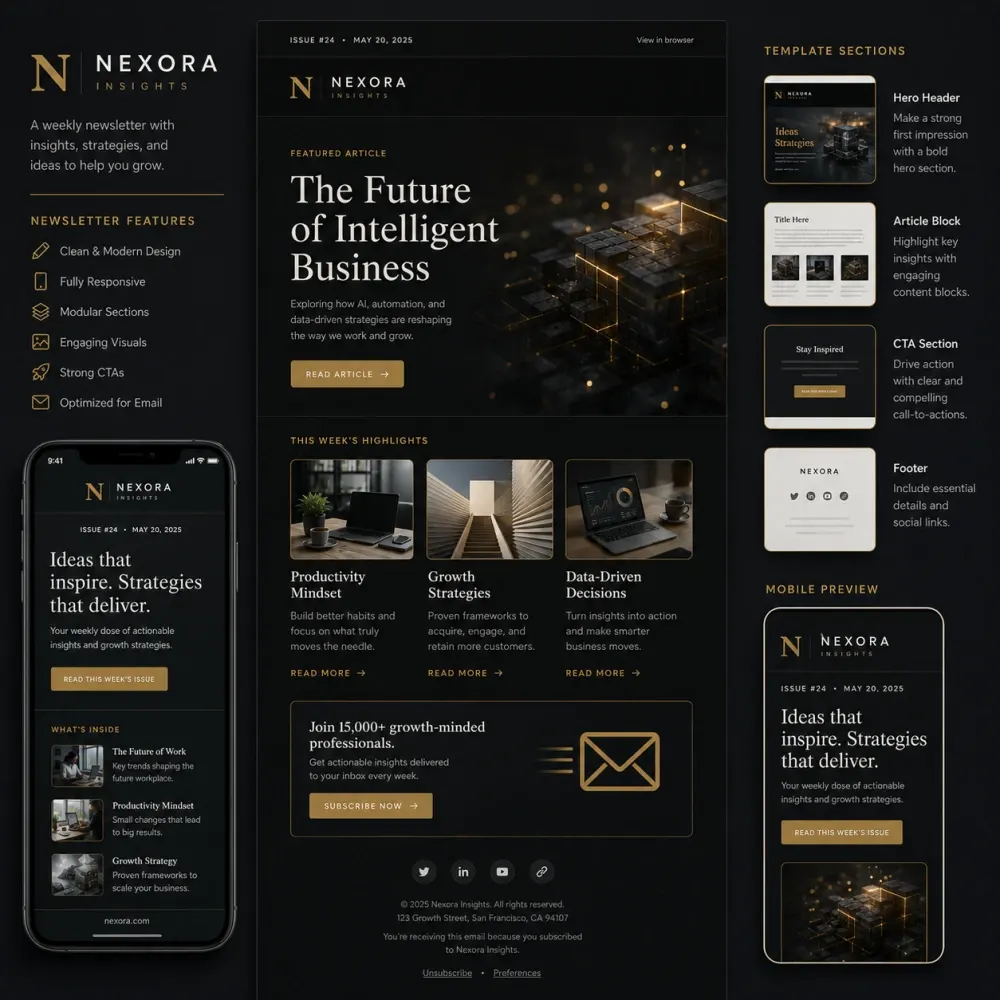
One template system for the messages your team sends again and again — no rebuilding the look of every campaign from scratch.
The campaign changes every week. The system behind it should not.
Most email teams lose hours re-solving the same design problems. A new campaign begins, someone copies an old email, a colleague tweaks the spacing, a button quietly gains a new style, and by the third send the brand looks like three different companies.
DesignBub designs email template systems for ecommerce brands, SaaS teams, agencies, publishers, nonprofits and B2B marketers that send email regularly and need the visual side to hold together.
Our work covers promotional templates, product launches, lifecycle flows, transactional layouts, B2B campaigns and full modular systems — one shared design language, with a structure for each type of message.
We start with how your team actually sends mail. Which platform? Who builds the campaigns? How often do you send? Which blocks repeat — product cards, article rows, event modules, coupon areas, account details? And does the team need to edit everything by drag-and-drop after handoff?
Those answers shape the system before a single colour is chosen. A good template makes the next campaign faster to build, not another file only its designer understands.
One system for the campaign types you send most.
Responsive structure, reusable modules, platform fit and a clear handoff — planned around your real sending workflow, not around a single pretty email.
Responsive Template Design
Desktop and mobile layouts with a clear reading order, tappable buttons and content that stacks sensibly on small screens.
Email UI 02Modular Email Systems
Hero, product, article, event and CTA blocks your team can mix and match, so each campaign is assembled — not redesigned.
Reusable Modules 03HTML Email Development
Table-based, inline-styled HTML coding can be added when the project needs a production-ready template, not just a design file.
Email Coding 04Platform Template Setup
Structures shaped around Mailchimp, Klaviyo, HubSpot or Salesforce editors, so the design survives the way your team actually builds campaigns.
Platform FitEmails people actually open — and finish
Six recent email directions — promos, welcome flows, lifecycle, transactional, invites and systems — each one built to look right in the inbox.
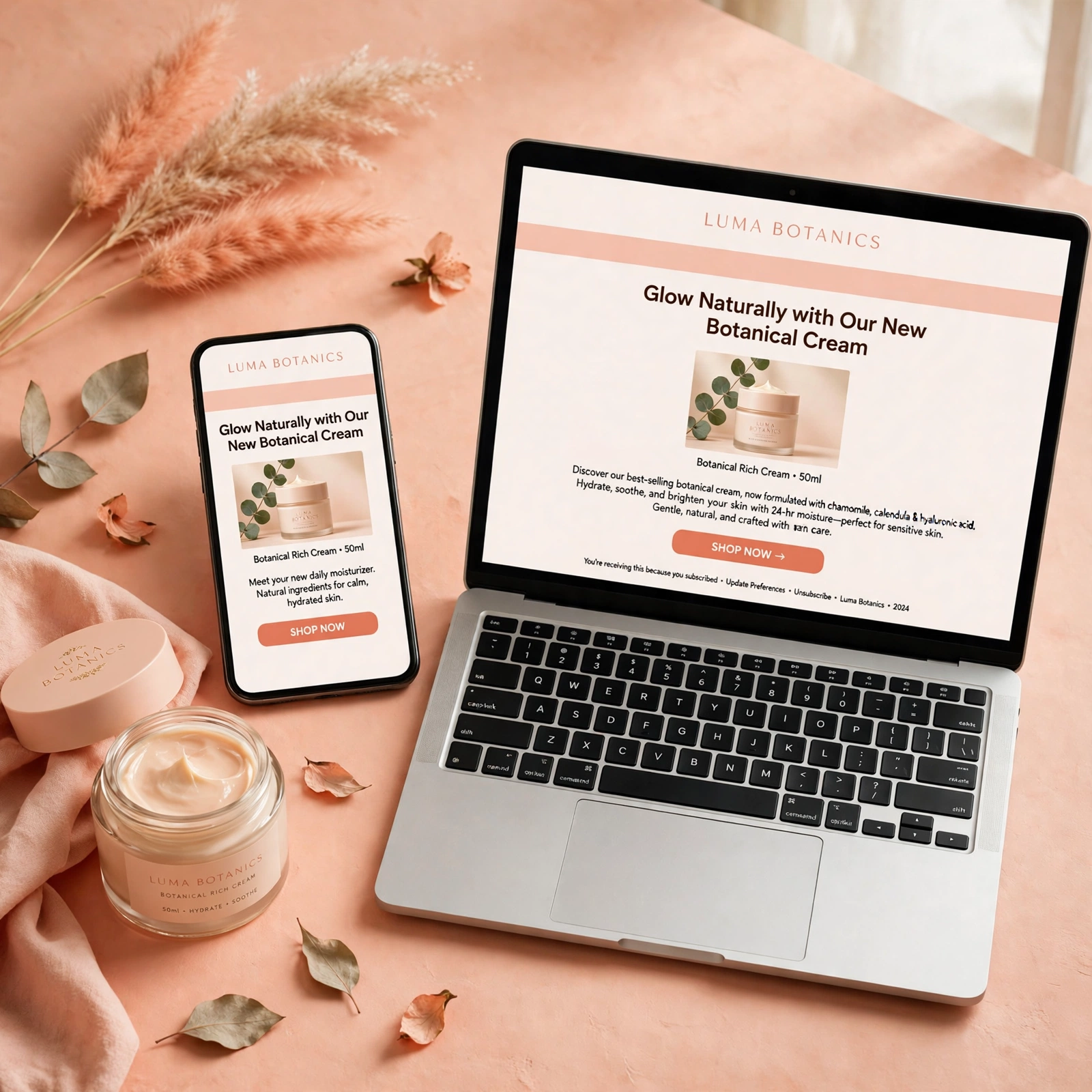
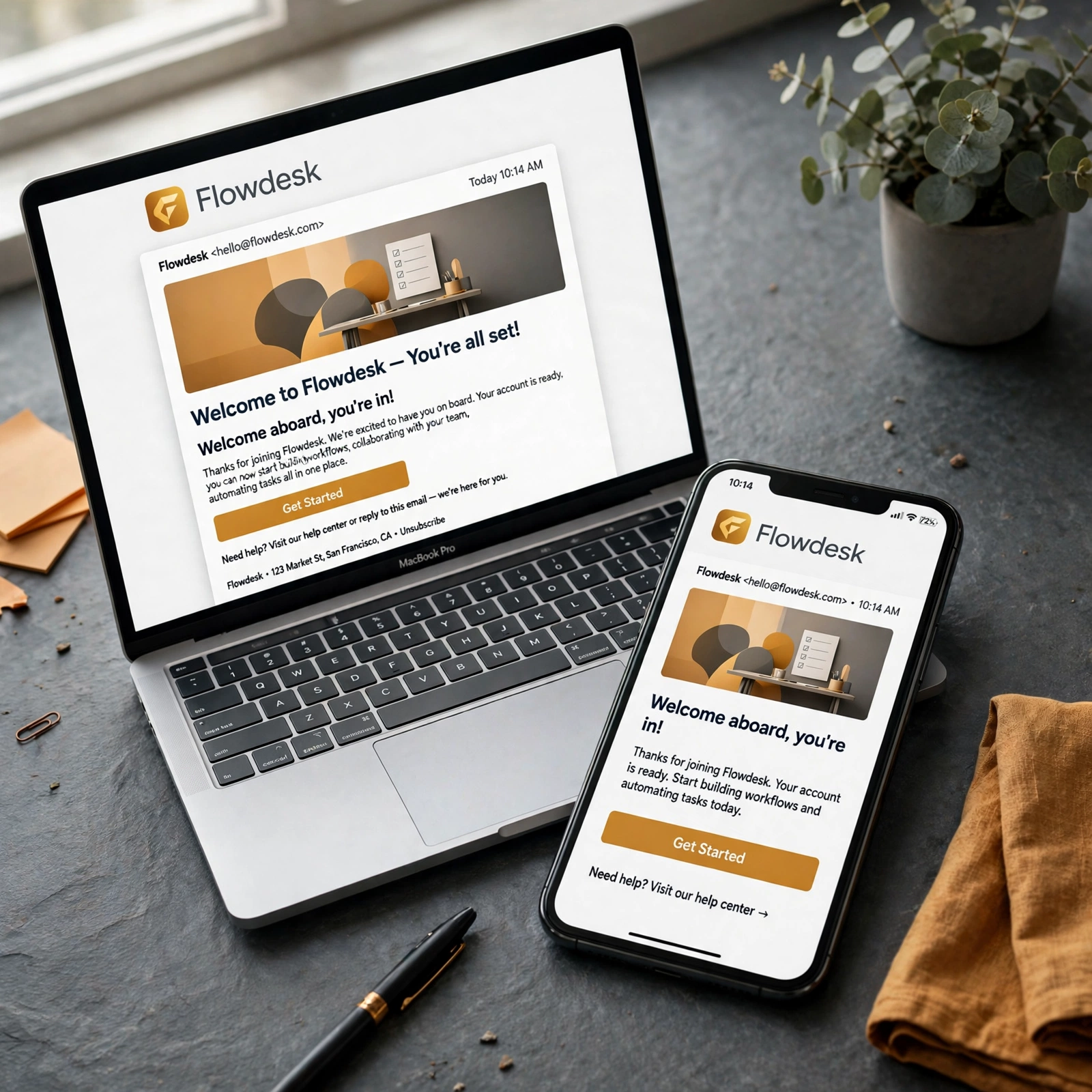

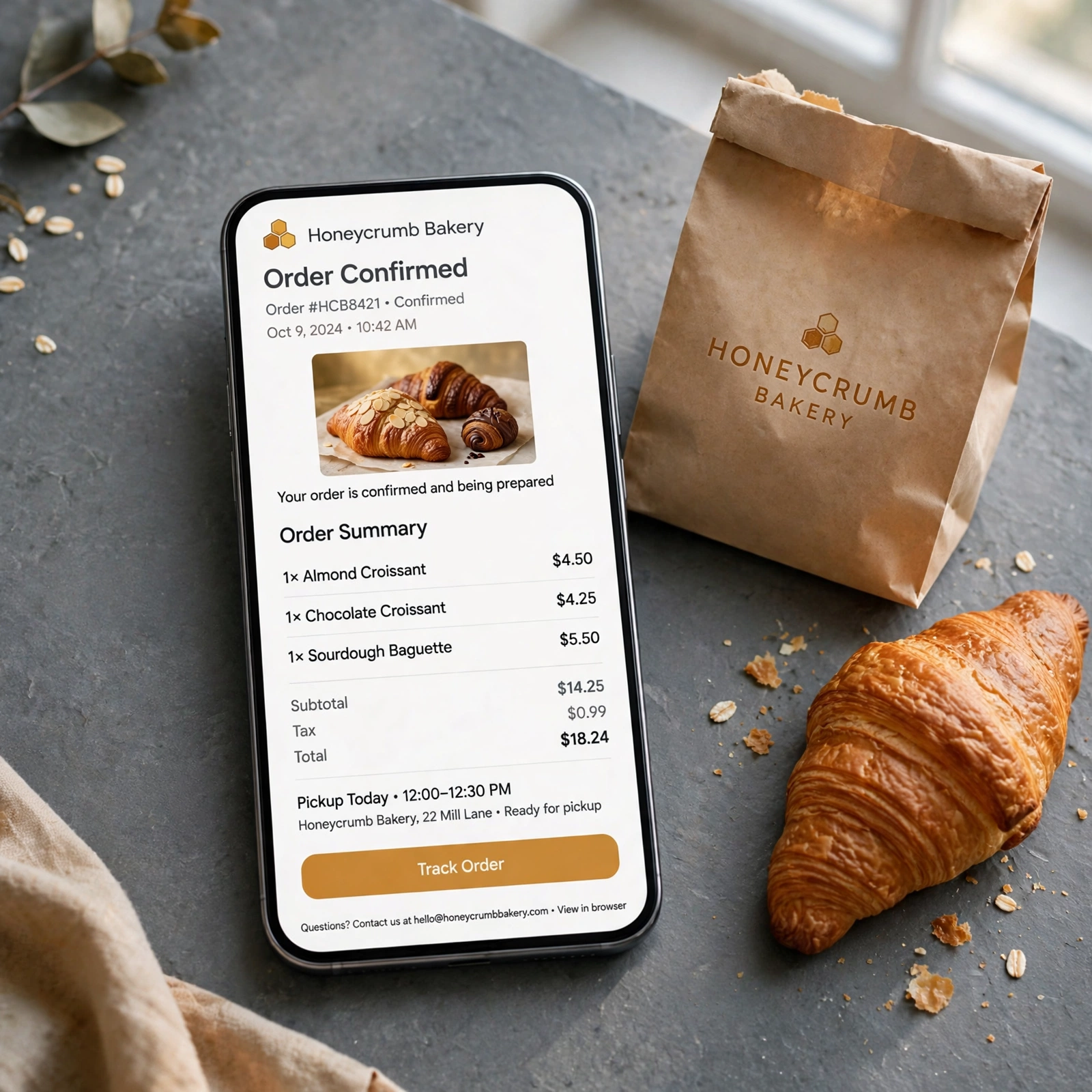

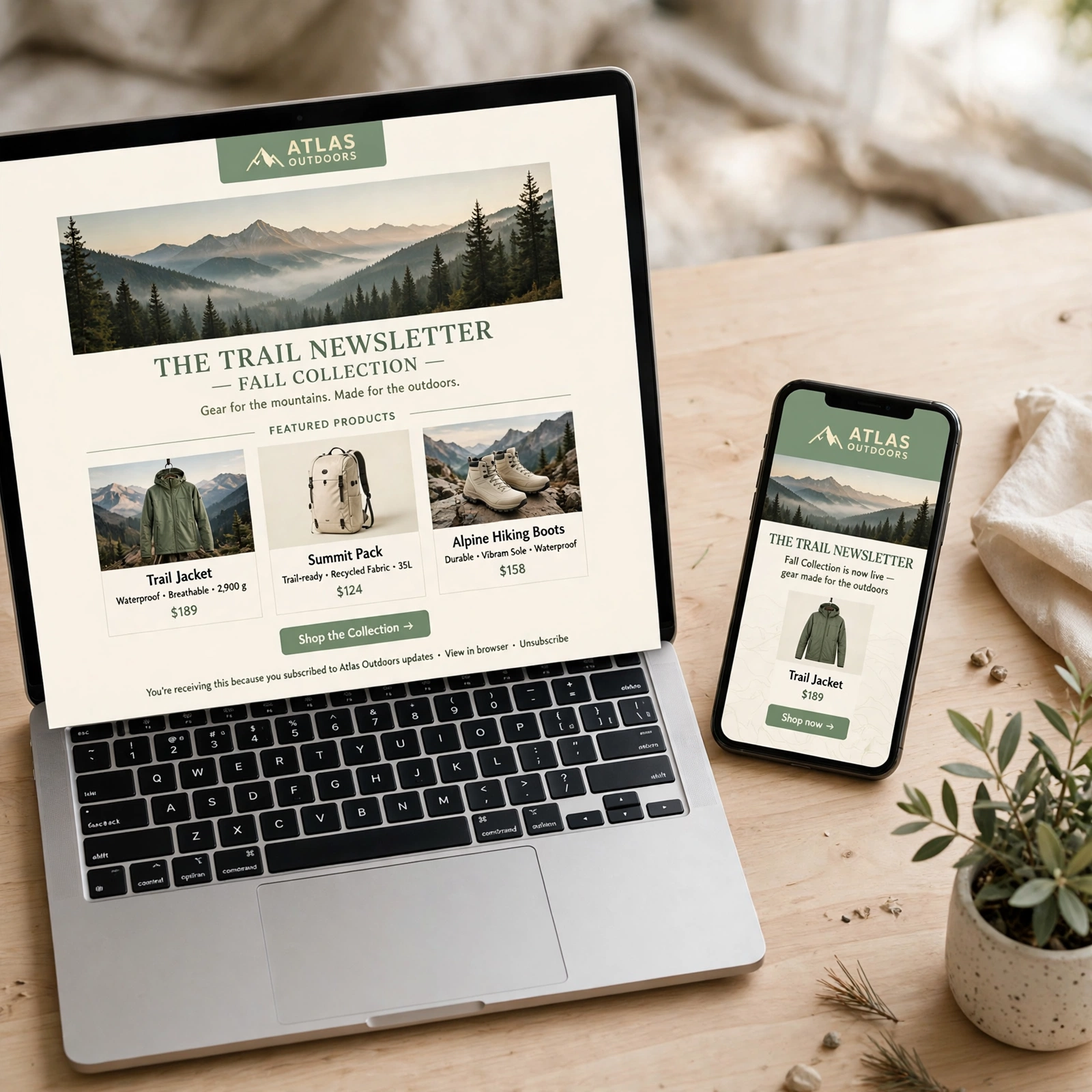
What an email template system can contain.
A template system can cover content hierarchy, template architecture, responsive layouts, branded headers and footers, hero sections, article blocks, product cards, buttons, banners, dividers and reusable modules — everything a team needs to assemble campaigns without starting from a blank page.
One project might deliver a single campaign template; another might build a whole family. An ecommerce brand may need a promotion, a product launch, an educational email and a customer-update format. A B2B company may need a thought-leadership email, a webinar invitation, a case-study campaign and a sales follow-up.
We never force those messages into one rigid layout. One visual language, with a structure fitted to each message type — that is what keeps future campaigns quick to build and the brand easy to recognise.
Responsive Layouts
Desktop and mobile structures planned around how inboxes really behave.
Reusable Modules
Flexible blocks for offers, products, articles, events and calls to action.
Platform Fit
Design choices shaped around the email tool your team actually opens every day.
Clear Handoff
Editable design, exported assets and implementation notes, according to scope.
Templates built from your brand, not from a premade layout.
Custom template work begins with the brand and the way the team sends mail — not with a generic design that happens to look nice. The template should sound like the business and work like the team works.
A brand led by product photography needs flexible image-led sections. A business that teaches needs comfortable reading and a clear article hierarchy. A team that promotes every week needs reusable offer blocks, product grids and campaign banners it can reach for without thinking.
Custom does not mean more visual effects. Email works best when the design stays clear and practical, so we use typography, colour, spacing, imagery and button styles to make the brand recognisable — without making the template hard to maintain.
Mobile first, because the inbox is mostly a phone.
People open email on many screen sizes, so responsive design is planned from the first sketch, not added at the end. A balanced two-column section on desktop can turn cramped on a phone; small buttons become hard to tap; a long headline wraps into an awkward block.
We decide how columns stack, how padding behaves and which content comes first on smaller screens. Images keep their subject visible, buttons stay easy to use, and the mobile version feels like the same campaign reorganised for a smaller screen — not a desktop layout that broke.
Every platform has its own responsive limits. We design inside those real limits instead of approving a layout that looks impressive in a mockup and cannot be built reliably.
From visual layout to working HTML email.
A visual email layout and a working HTML email are related, but they are not the same job. HTML email follows stricter rules than ordinary web development, because inboxes do not all support code in the same way.
When coding forms part of the project, we build the approved design with email compatibility in mind — table-based layout, inline styling, responsive media queries and fallbacks where the requirements call for them.
If your own developer will handle the coding, we supply the design files, asset exports and clear specifications they need. Design and coding are defined separately, so the team knows exactly what the project includes before production begins.
A system of modules, not one fixed page.
A reusable template works best when it behaves like a system. We build modules the team combines differently for each campaign, instead of one layout that must fit everything.
One module carries a hero image and headline. Another presents products. A text block supports a short story. An event module shows a date, a venue and a registration button. The footer stays the same across every send.
That approach gives the team real flexibility without letting every campaign drift into a different visual language — and it means a change of content never forces a redesign of the whole email.
Marketing emails that give the reader a reason to keep going.
A marketing email needs a clear reason to continue: an opening that says what the campaign is about, a middle that supports the message, and one main action that is easy to understand.
Our marketing templates support product announcements, services, content promotion, offers, events, lead nurturing and brand communication. A short promotion may need only a hero, the offer details and a button; an educational campaign may need several sections and supporting links.
We give the team enough options for useful variation — without encouraging every send to become longer than it needs to be.
Promotional emails where the offer is understood in seconds.
A promotion, launch or time-sensitive offer lives or dies on hierarchy. The reader should understand what is on offer quickly, without hunting through several competing messages.
Prices, discount codes and deadlines come from the business and are approved by the business — we make the offer prominent while keeping the design firmly connected to the brand.
A premium brand may suit a quiet layout with one strong image; a retail campaign may need a more direct price message. The right treatment depends on the audience and the offer. Design can support clarity, but it cannot guarantee opens, clicks, conversions or revenue.
Ecommerce templates for every message a store sends.
A store’s inbox life is busy: new arrivals, product launches, sales, back-in-stock notes, cart reminders, post-purchase emails and educational content — all from the same brand.
One ecommerce template system ties those messages together. Product cards share the same image areas, names, prices and buttons; offer blocks follow one recognisable style; category modules support collection campaigns.
Real product and approved commercial information stay central. Prices, discounts, stock status and claims come from the store or campaign data — the design organises the information, it never invents it.
Lifecycle templates for every stage of the customer relationship.
Lifecycle mail follows the customer: a welcome for someone who has just joined, onboarding that helps a new user take the next step, a reminder that brings attention back to an unfinished action, and retention mail that introduces new value to an existing customer.
Those messages should feel related, but they do not need identical layouts. A lifecycle system builds a family of templates with shared typography, buttons, header rules and spacing — while giving each stage the structure it needs.
Automation logic, segmentation and trigger setup are scoped separately from the visual template work.
Transactional emails where clarity comes before promotion.
Transactional mail carries information the recipient is waiting for: order confirmations, shipping updates, password resets, account alerts, booking confirmations and receipts.
Here the design priority changes completely. Clarity matters more than persuasion. An order confirmation should make the order number, the items, the price and the next steps easy to find; a password reset should make the secure action obvious.
These templates still carry the brand — without letting it hide the functional information. Technical implementation normally depends on the ecommerce, CRM or application system that sends the message.
Pick the starting point that fits how often your team sends.
Pricing follows the size of the template system, the responsive requirements and how deep the implementation goes. Final scope can change when a project needs more templates, custom code, complex dynamic content or wider inbox testing.
Essential Email Template
A focused branded template for one main campaign type.
- 1 custom email template
- Desktop + mobile layout
- Up to 6 reusable sections
- Brand typography, buttons and spacing
- Editable design source
- 2 revision rounds
Modular Email System
A flexible reusable system for recurring marketing campaigns.
- 1 master template system
- Up to 10 reusable modules
- Desktop + mobile layouts
- Marketing, content and product blocks
- Mailchimp, Klaviyo or HubSpot-ready structure
- 3 revision rounds
Email System + HTML
Design plus responsive HTML implementation for a production-ready system.
- Modular email design system
- Up to 12 reusable sections
- Responsive HTML coding
- Basic Gmail + Outlook review
- Platform-ready handoff
- 3 revision rounds
Need one specific email design task?
These starting rates help when a full template package is not necessary.
Pricing note: Prices are starting USD fees. Copywriting, lifecycle strategy, automation logic, list management, deliverability consulting, CRM configuration, premium stock or font licenses, paid email-platform plans and third-party tools are separate unless the project scope specifically includes them. No open-rate, deliverability, conversion or revenue outcome is guaranteed.
B2B templates that respect a busy reader’s time.
B2B campaigns usually carry more text than retail mail, because the message may explain an event, a report, a service or a business idea. The design should support reading without turning the email into a long document.
We use a clear opening, short content sections, resource cards and one or two useful actions. A webinar invitation can highlight the date and registration details; a case-study email can summarise the problem and link to the full story.
B2B email design works best when useful information is easy to scan and the reader never feels their time is being wasted.
SaaS email systems that connect product and customer mail.
A SaaS business uses email across product marketing and customer communication: onboarding tips, feature announcements, usage reminders, trial messages, billing notices and educational content, all from the same company.
One SaaS email system connects those messages through recurring typography, buttons, spacing and branded components — with reusable patterns for feature highlights, screenshots, step-by-step instructions, release notes and account information.
Technical, pricing or account information comes from the business in its approved form. The design makes that information easier to understand without changing what it means.
Newsletter modules inside the wider email system.
When a business sends regular content updates, the newsletter becomes one template family inside the wider email system — with modules for a lead story, short updates, articles, events, products, announcements and secondary links.
That family has to handle real variation. A headline grows longer next month; one issue carries four stories and the next only two. The modules adapt without losing their visual order.
For teams that publish often, that flexibility saves more time than a decorative layout with rigid content limits.
Mailchimp templates shaped around its editor.
Mailchimp gives teams a visual editor and reusable components, so the design must fit that editing model. We build branded Mailchimp templates with practical blocks for the campaign types the team actually sends.
Hero sections, text areas, image cards, product highlights, buttons, dividers and footer content — arranged so the team can keep editing internally without custom code for every small change.
Where the project includes Mailchimp implementation, we prepare the approved design inside the available platform tools, or scope custom HTML where needed. List management, automation strategy and deliverability stay separate unless specifically included.
Klaviyo templates for campaigns and lifecycle flows.
Klaviyo is the daily tool of many ecommerce teams, so its templates must support both promotional campaigns and lifecycle flows. We design branded layouts for launches, promotions, welcome flows, abandoned-cart campaigns and post-purchase communication.
The structure accounts for dynamic product blocks and reusable content sections where the implementation supports them, keeping the focus on visual consistency and content clarity.
Flow logic, audience segments, triggers and advanced personalisation need separate marketing-automation planning.
HubSpot templates that sit inside the CRM workflow.
HubSpot email campaigns usually sit inside a wider marketing and CRM workflow — newsletters, lead-nurture mail, webinar invitations, content promotions and sales-support campaigns.
We create HubSpot-friendly layouts with reusable sections and clear hierarchy, supporting links to forms, landing pages and resources without trying to squeeze every CRM function into the email itself.
Where platform implementation forms part of the project, we work within HubSpot’s available email-building tools and module structure. Complex automation, lead scoring and CRM configuration stay separate unless the scope includes them.
Drag-and-drop templates your team can actually edit.
Many marketing teams want to update emails without touching code. A drag-and-drop template supports that — when the selected platform allows reusable blocks.
We design modules with realistic editing in mind. Text areas leave room for shorter and longer copy. Image sections use predictable aspect ratios. Buttons stay stable when the label changes. Multi-column layouts have clear mobile behaviour.
The aim is useful freedom for the team, without so much freedom that every campaign drifts away from the brand.
Email accessibility, built into the template.
Accessible email design makes the message easier for more readers: clear text hierarchy, readable contrast, useful link wording and sensible spacing, with buttons large enough to interact with comfortably.
Important information should never exist only inside an image. Where HTML implementation is included, we support alt text, a useful reading order and other accessibility-minded details the email environment allows.
Formal requirements vary by organisation and market. We apply accessibility-minded design practices; formal compliance claims need the appropriate testing and an agreed standard.
Built for Gmail, Outlook and Apple Mail — not just the browser.
The same template can render differently in Gmail, Outlook, Apple Mail and other clients, because each inbox handles HTML and CSS in its own way.
We design around practical email patterns instead of assuming browser-level support. Where HTML development is included, testing can cover an agreed set of clients and devices, and complex interactive features get fallback designs or a simpler approach.
The aim is not a pixel-identical inbox everywhere. It is a message, a hierarchy and main actions that stay usable across the environments that matter to the campaign.
Redesigning a template system that has drifted.
An existing email system can need improvement even when the brand has not changed: the layout feels dated, mobile spacing is inconsistent, and different teams have created several button and header styles.
A redesign brings consistency without rebuilding the whole marketing stack. We review the templates in use, identify the content types that repeat, and simplify where we can.
Useful modules stay. Weak or duplicated patterns are replaced. The redesigned system should make future production easier — not simply make one campaign look newer.
Our email design process, from workflow to handoff.
We start with the workflow. You share the email platform, campaign types, audience, brand assets, existing templates and editing requirements.
Next we identify the modules the team uses most often and organise them into a template architecture. Then we build the visual direction — typography, colour, imagery, spacing, buttons and recurring sections.
You review the primary template and share consolidated feedback. After approval, we create the agreed variations and reusable modules. If development forms part of the scope, we code the approved design and test the agreed environments.
Before handoff, we document the main editing rules, so the team knows how to use the system without breaking the hierarchy.
What can be included in your email template project.
A project can cover marketing emails, promotional campaigns, ecommerce templates, B2B mail, SaaS mail, lifecycle layouts, event campaigns, newsletter modules, transactional designs and reusable modular systems.
It can also include responsive layouts, mobile adaptations, branded headers and footers, product blocks, content cards, CTA styles, dark-mode considerations, HTML email coding, platform implementation and template documentation.
The right scope depends on how the team works. One campaign template and a complete email design system are not the same project: a business with one monthly update may need a focused reusable layout, while a larger ecommerce or SaaS team may need several template families and many modules.
Why choose DesignBub for email template design?
Email templates should make communication more consistent and production less complicated. We treat template design as system-building, not a one-time visual exercise.
We look at the campaign types the business sends, the platform the team uses and the parts of the layout that change most often — then build reusable design rules around those needs.
The brand stays recognisable, and the template stays practical. Mobile gets the same attention as desktop. Buttons, images and text blocks each have a clear role. Where HTML development is needed, email-client limits are considered before any complex idea is approved.
A stronger template can improve clarity, consistency and production efficiency. It cannot guarantee opens, clicks, deliverability, leads, conversions or sales — those also depend on the list, sending reputation, subject line, offer, timing, segmentation, content and destination experience.
Straight answers before you build a reusable email system.
Platforms, responsive behaviour, HTML implementation, editing after handoff and project scope — answered plainly.
A single template serves one campaign type. A template system is a family of reusable layouts and modules — hero, product, article, event and CTA blocks — that share one design language, so your team can assemble many campaign types without redesigning each one.
Yes. We design the structure around the platform your team uses — Mailchimp, Klaviyo, HubSpot or another agreed tool — so the modules fit its editor and the team can keep editing internally after handoff.
Yes. Responsive HTML email coding can be included in the project or scoped separately from the visual design, with testing across an agreed list of email clients and devices when implementation forms part of the scope.
Yes. We design order confirmations, shipping updates, password resets, account alerts and booking messages around clear functional information, applying the brand without hiding what the recipient needs to find.
Cost depends on the number of template types, reusable modules, responsive behaviour, platform implementation, HTML coding and testing. A single branded template needs less work than a complete modular system, and we confirm the schedule after reviewing your campaign types and internal workflow.
Stop rebuilding the email every time the message changes.
The content of an email should change more often than the design rules behind it. A promotion needs different products. A webinar needs another headline. A monthly update brings new stories. A lifecycle email speaks to another stage of the customer journey.
Those changes are normal — and the brand should not need a new visual system every time they happen.
DesignBub builds email template systems for teams that want a dependable starting point for regular campaigns. You can begin with one old email, a library of inconsistent templates, a new brand identity or a list of the campaign types your team sends every month.
We turn those requirements into reusable layouts and modules that make future emails easier to build, while keeping the visual identity under control.
The best email template is not the one with the most sections. It is the one your team can reuse without losing clarity, consistency — or the reason the email exists.