">

AI Automation Services for Business Workflows

DesignBub builds AI automation systems around real business processes. We help automate lead handling, customer support, CRM updates, follow-ups, WhatsApp conversations, document processing, reporting and repetitive internal work while keeping human review where it matters.

WorkflowBuilt around the process
HumanApproval where it matters
ConnectedCRM, chat, data & tools
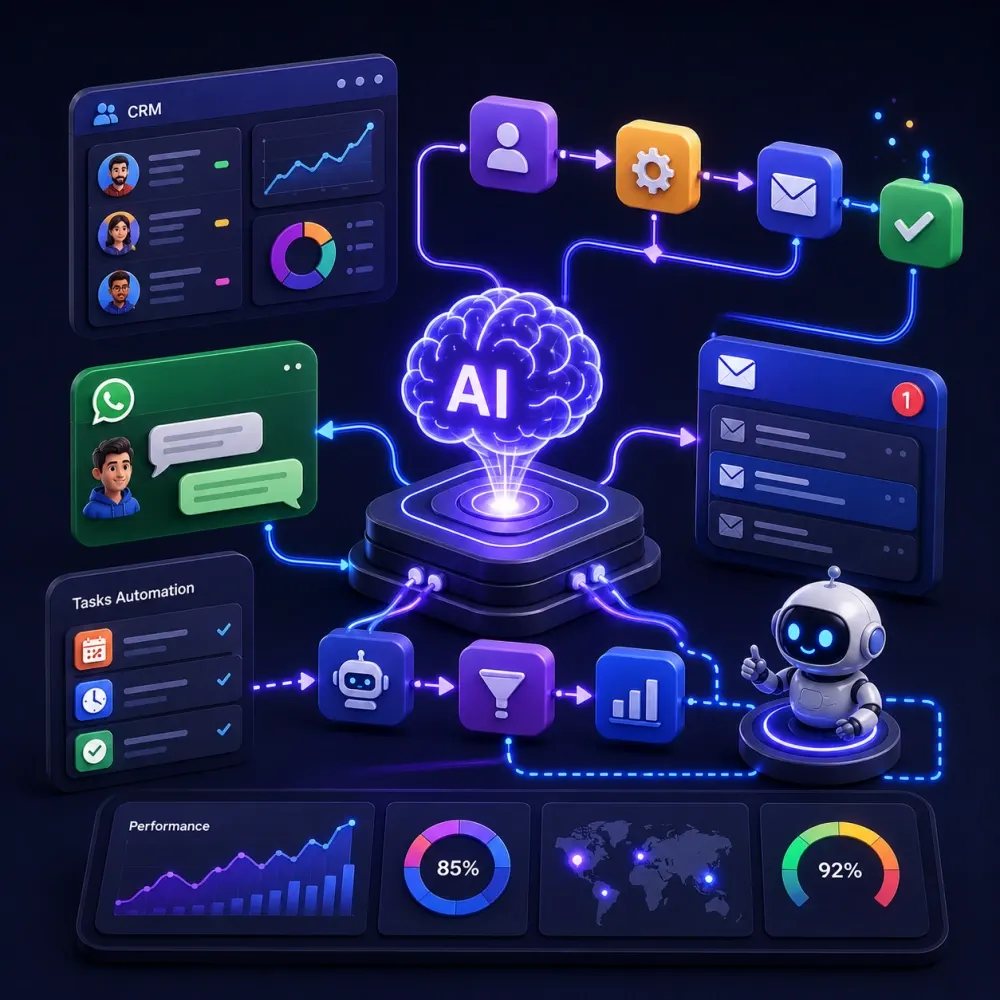
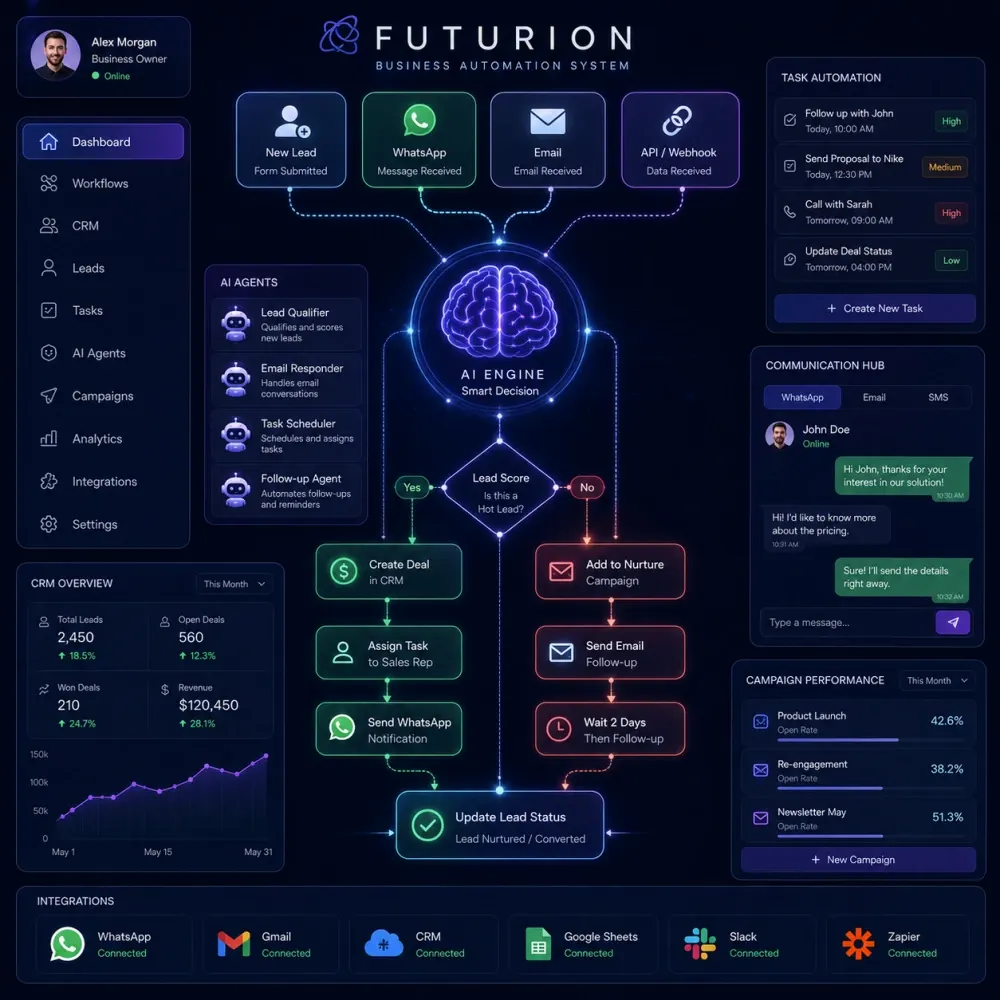
AI business automation workflow
AI workflow automation system
Automation With Control

AI chatbots, CRM workflows, lead routing, integrations and human escalation designed as one connected system.

Selected Brands in Our Portfolio
Asset 38 brand logo Asset 4 brand logo Asset 45 brand logo Asset 46 brand logo Asset 47 brand logo Decent Solar logo Dentesthetix logo Gazal Lounge logo GH Landscape logo Asset 38 brand logo Asset 4 brand logo Asset 45 brand logo Asset 46 brand logo Asset 47 brand logo Decent Solar logo Dentesthetix logo Gazal Lounge logo GH Landscape logo
Ghazoor logo Goodluck Trader logo Kingsley logo Lahoris logo MOI logo Naqaa Salt logo Nature Hug logo Netsole logo Ghazoor logo Goodluck Trader logo Kingsley logo Lahoris logo MOI logo Naqaa Salt logo Nature Hug logo Netsole logo
Nexcell Energy logo Roots logo Sheikh logo Shellbee logo Softcore logo Solvac Lifesciences logo Trendex logo Zameenex logo Nexcell Energy logo Roots logo Sheikh logo Shellbee logo Softcore logo Solvac Lifesciences logo Trendex logo Zameenex logo
AI Automation for Business

Automate the right work, not every piece of work.

AI can be useful when it removes repetitive steps, helps teams process information faster and connects systems that otherwise depend on manual updates. It becomes less useful when it is added to a process simply because a business feels it needs β€œAI.”

DesignBub provides AI automation services for businesses that want practical systems built around real workflows. A project can involve lead handling, CRM automation, customer support, appointment workflows, document processing, reporting, internal approvals, WhatsApp conversations or other repeatable tasks.

Our approach starts with the process rather than the tool. We first look at what your team is doing manually, where work gets delayed, what information moves between systems and which decisions should remain with a person. We then design the automation around those realities.

Some projects need AI models. Others only need reliable workflow logic. Many need both. The objective is to reduce unnecessary manual work while keeping the system understandable, testable and controlled.

What AI Automation Means

AI automation combines workflow logic, integrations and intelligence.

Workflow Automation

Traditional workflow automation follows predictable rules. A new form submission can create a CRM record, send a confirmation email, assign a salesperson and schedule a reminder. When the steps are clear, normal automation is often the most reliable solution.

AI Workflow Automation

AI workflow automation adds interpretation to the process. A system can classify an enquiry, summarize a conversation, extract information from a document or draft a response before the next workflow step begins.

AI Agents

AI agents can work through multi-step tasks using connected tools inside defined permissions. An agent might check a CRM, review approved knowledge, prepare an action and request human approval before updating another system.

Human-in-the-Loop

Important decisions do not need to be handed to an automated system. Approval points, escalation rules and confidence thresholds can keep people responsible for exceptions, sensitive cases, negotiations and high-impact decisions.

AI Automation Services

Automation solutions built around sales, support and operations.

Each service can be delivered as a focused workflow or connected into a larger business automation system. The scope depends on your process, integrations, data and level of human oversight.

01

AI Workflow Automation

Connect repetitive steps across forms, inboxes, CRM systems, spreadsheets and internal tools using rules, AI classification and structured handoffs.

Workflow
02

Custom AI Agents

Build controlled AI agents for multi-step tasks, tool use, research inside approved sources, record updates and approval-based actions.

Agents
03

AI Chatbot Development

Create website or business chatbots that answer approved questions, collect lead information, guide users and escalate uncertain requests.

Chatbot
04

CRM Automation

Automate lead creation, conversation summaries, pipeline updates, follow-up tasks, notifications and other routine CRM administration.

CRM
05

Lead Automation

Capture, qualify, categorize and route enquiries from forms, chat, ads or messaging channels into one structured sales process.

Leads
06

Customer Support Automation

Answer approved FAQs, collect issue details, categorize support requests and escalate unusual or sensitive conversations to a person.

Support
07

WhatsApp Automation

Build structured WhatsApp workflows for enquiries, qualification, customer information, follow-ups, appointment steps and team handoff.

WhatsApp
08

Document Automation

Extract, summarize and route information from submitted PDFs, forms, emails and business documents with verification steps where needed.

Documents
09

Reporting Automation

Gather approved information from connected systems and prepare recurring summaries, internal notifications and operational reports.

Reporting
10

API & System Integrations

Connect supported CRMs, forms, websites, messaging tools, databases and business software using available APIs and integration methods.

Integrations

AI Chatbots and Virtual Assistants

AI chatbots can help businesses answer common questions, collect lead details and direct people to the right next step. A useful chatbot should be connected to approved business information rather than relying on generic model knowledge.

That information can include services, product details, pricing rules, policies, opening hours, delivery information or an internal knowledge base. The assistant can answer within that scope and hand the conversation to a person when the question is uncertain, sensitive or outside the approved material.

CRM Automation and Sales Workflows

CRM systems become less useful when people are too busy to keep records current. CRM automation can create leads, attach enquiry details, summarize conversations, assign follow-up tasks and update defined stages when clear events occur.

AI can help interpret free-form messages before the information reaches the CRM. Important commercial decisions, negotiation, exceptions and sensitive customer situations can still remain with the sales team.

Lead Capture and Qualification

Potential customers may arrive through forms, WhatsApp, website chat, advertisements or email. When each channel is handled separately, leads can be missed or answered inconsistently.

Lead automation can collect the enquiry, ask approved qualification questions, record the answers, route the lead and create a follow-up. AI can be useful when customers describe their requirements naturally rather than selecting from fixed options.

Customer Support Automation

AI customer support automation can reduce repetitive triage. An assistant can answer approved FAQs, collect account or order context, categorize the request and prepare information before a human takes over.

Complaints, unusual cases, account changes and questions the system cannot verify should have a clear human path. Good support automation knows when it should stop answering.

WhatsApp Automation

WhatsApp can be part of a wider lead or support workflow. A system may greet the user, collect details, answer approved questions, create or update a CRM record and hand the conversation to the right team member.

AI makes the interaction more flexible when customers write in natural language, while business rules keep the process structured. Platform policies, messaging permissions and provider requirements still need to be respected.

Document and Data Automation

Many operational processes still depend on PDFs, emails, uploaded forms and spreadsheets. AI can help extract specific fields, classify documents, create summaries and move approved information into another system.

When extracted information affects financial, legal, medical or other high-impact decisions, human verification should remain part of the workflow. Speed should not remove appropriate control.

Reporting and Internal Operations

Automation can gather approved information from a CRM, project tool, spreadsheet or support system and prepare recurring summaries for the right people. Internal workflows can also manage task assignment, reminders, approvals, onboarding checklists and status notifications.

Some of the most useful automation is invisible to customers. It simply removes repetitive administrative work that would otherwise consume team time every day.

Business Process Automation

Business process automation looks at the complete journey rather than one isolated task. Mapping what happens from the moment a request enters the business until the work is complete can reveal duplicated data entry, missing handoffs and approval steps that rely on memory.

We use that map to decide what should be automated, what should remain manual and where AI can add useful interpretation without creating unnecessary complexity.
Where AI Automation Helps

Different teams need different automation logic.

A useful automation system should reflect how the department already works and where manual effort is being lost.

Sales Teams

Capture leads, summarize conversations, create CRM records, assign follow-ups and keep routine pipeline administration moving without replacing sales judgment.

Customer Service

Answer approved questions, collect context, categorize requests and escalate conversations that require empathy, judgment or account-level decisions.

Operations

Automate approvals, task routing, reminders, document handling, status updates and recurring reporting across internal teams.

Ecommerce

Support product-information workflows, order-related communication, enquiry routing and customer-service triage using reliable connected data.

Real Estate

Collect property preferences, price range and visit requirements before routing qualified enquiries to the appropriate sales representative.

Professional Services

Automate intake, appointment steps, document collection, reminders and internal routing while keeping confidential or professional decisions under human control.

Marketing Teams

Use automation for lead nurturing, audience tagging, campaign notifications, reporting and draft assistance without turning public communication into unsupervised output.

Management

Receive structured summaries, exception alerts and operational reporting so attention can stay on decisions rather than manual information gathering.

Custom vs Off-the-Shelf

Use custom AI automation only when the process actually needs it.

Off-the-shelf software can be the right choice when your process already matches the product. There is no reason to build custom automation if a reliable existing tool solves the requirement well.

Custom AI automation becomes useful when a workflow crosses several systems, needs business-specific logic, requires a controlled knowledge source or contains approval rules that generic software cannot handle cleanly.

Custom does not mean replacing everything you already use. A project can connect existing CRM, forms, email, spreadsheets or messaging systems instead of rebuilding them.

We aim for the simplest reliable architecture that can support the required process, because every unnecessary tool or integration creates another point that may need maintenance later.

Finding the Right Automation Opportunities

The best place to start is usually a repeated process with clear inputs and a measurable outcome.

Look for repetitive work before looking for AI

A useful automation opportunity usually appears where the same action happens again and again. Staff may copy enquiry details into a CRM, send the same follow-up reminders, prepare the same type of report, route incoming requests or move information between systems. These tasks are easier to evaluate because the current process can be observed and compared with the automated version.

Before development, we ask what starts the process, what information is required, what decision is being made and what should happen at the end. This makes the workflow easier to test and prevents the project from becoming a collection of disconnected features.

Separate predictable rules from interpretation

Not every step needs artificial intelligence. If a form field says β€œWebsite Design,” a normal rule can route that enquiry to the correct team. AI may become useful when the customer writes a paragraph describing several needs and the system has to identify the main request, extract important details or create a useful summary.

Using standard automation for predictable steps and AI only where interpretation is valuable can make the system easier to maintain. It also reduces the number of places where a probabilistic model is being asked to make a decision that could have been handled by a simple rule.

Define what success means

An automation project should have a practical outcome. That might be faster lead response, fewer missed follow-ups, less manual data entry, shorter support triage, more consistent CRM records or quicker preparation of recurring reports. Clear outcomes make it easier to decide whether the workflow is actually helping after launch.

Plan exceptions before they happen

Real business processes contain incomplete forms, unusual customer requests, duplicate records, unavailable integrations and information that does not fit the expected pattern. A reliable workflow needs a defined response to these exceptions. It may create an alert, place the task into a review queue or ask the customer for missing information instead of guessing.

This is especially important in AI automation for business because a fluent response can still be wrong. The system should have clear limits on what it can say or do and an obvious path to human review when those limits are reached.

Consider the ongoing operating cost

Automation is not only an implementation project. Connected tools may charge subscription, API, messaging, storage or AI model usage fees. Higher conversation volume or document processing can increase those costs over time.

We therefore consider both the build and the operating model when discussing architecture. A technically impressive workflow is not useful if its ongoing cost is disproportionate to the business value it creates.

Build in stages when the process is large

For complex operations, a smaller first workflow can be safer than trying to automate an entire department at once. The first stage can validate integrations, data quality, user behaviour and escalation logic. Once that foundation works reliably, additional steps or departments can be added with less uncertainty.

This staged approach is useful for custom AI automation, AI agents and multi-system projects because it allows the business to learn from real use before increasing autonomy or connecting more critical systems.

AI Automation Process

From manual workflow to tested automation.

We separate process discovery from development so the automation is designed around real business rules rather than a demo flow.

01

Discovery

We understand the current process, people involved, tools in use, repetitive tasks and the result you want to improve.

02

Opportunity Mapping

We separate simple rule-based tasks from steps that may benefit from AI interpretation, extraction or generation.

03

Integration Review

We review systems, available APIs, access permissions, data sources and any steps that must remain under human approval.

04

Workflow Design

Triggers, actions, business rules, AI steps, approvals, fallbacks and error handling are mapped before the complete build.

05

Build

We connect supported systems and configure automation logic, prompts, knowledge sources and integrations around the agreed scope.

06

Testing

We test normal scenarios, incomplete information, edge cases and situations that should trigger a person instead of continuing automatically.

07

Launch & Handoff

After approval, the workflow is deployed with the agreed documentation, monitoring approach and launch support.

Project Deliverables

What an AI automation project can include.

Deliverables are selected around the process being automated rather than adding components that the workflow does not need.

Workflow Mapping
Automation Architecture
AI Prompt Logic
AI Chatbot Setup
Custom AI Agent
CRM Automation
Lead Routing
WhatsApp Workflow
Knowledge Base Setup
Document Processing
Human Approval Steps
Error Handling
API Integrations
Testing & Refinement
Technical Documentation
Launch Support
Responsible Automation

AI systems need boundaries, data controls and human oversight.

Automation can interact with customer messages, internal records and operational data, so access should be limited to what the workflow actually needs. We consider permissions, escalation rules, fallback actions and approval points during design instead of treating them as an afterthought.

Controlled Access

Connected accounts and tools should expose only the actions and information required by the workflow.

Human Escalation

Sensitive, uncertain or high-impact cases can be routed to a person instead of forcing the automation to decide.

Fallback Logic

If information is missing or an integration fails, the workflow should have a defined next step rather than silently continue.

Third-Party Review

When external AI or automation platforms are used, the client should review their privacy, retention, security and compliance terms for the intended use.

AI Automation Pricing

Three starting packages for different levels of workflow complexity.

These packages provide a clear starting scope. Final requirements can change the price when the project needs additional integrations, complex data handling, custom dashboards, unusual provider restrictions or ongoing managed support.

Starter

Focused Automation

$399one-time implementation

For one clearly defined process that currently depends on repetitive manual work.

  • 1 core automation workflow
  • Up to 2 supported integrations
  • Lead, support or operations use case
  • Basic AI classification or response step
  • Human handoff / approval rule
  • Testing and launch documentation
Choose $399 Package on WhatsApp β†—
Advanced

AI Operations System

$3,990one-time implementation

For multi-step automation that needs AI agents, several integrations and stronger operational controls.

  • Up to 6 connected workflows
  • Up to 6 supported integrations
  • Custom AI agent or advanced assistant
  • CRM, support or sales automation
  • Document or structured-data workflow
  • Approval, escalation and error handling
  • Technical documentation and launch support
Choose $3,990 Package on WhatsApp β†—

Typical AI automation project pricing

Need one specific automation rather than a full package? These starting prices show how common projects are scoped. Final pricing depends on integrations, data access and workflow complexity.

Automation TypeStarting PriceTypical Scope
AI Chatbot SetupFrom $399Approved knowledge, FAQ handling, lead capture, human escalation and website integration planning.
WhatsApp AutomationFrom $499Enquiry flow, qualification, customer-data capture, CRM handoff and follow-up logic using supported provider access.
CRM Workflow AutomationFrom $399Lead creation, routing, pipeline actions, reminders, notes, summaries and connected notifications.
Lead Qualification SystemFrom $399Form or chat intake, qualification questions, categorization, scoring rules and salesperson routing.
AI Customer Support AssistantFrom $599Knowledge-based answers, support triage, issue categorization, escalation and conversation context.
Custom AI AgentFrom $659Multi-step task flow, connected tools, defined permissions, approval steps and controlled actions.
Document AutomationFrom $599Extraction, classification, summarization, structured data output and optional human verification steps.
Additional API IntegrationFrom $249One supported external system or service connected to an existing automation scope.

Important: Package prices cover the agreed implementation scope only. Third-party platform subscriptions, CRM fees, hosting, WhatsApp provider charges, messaging costs, AI model/API usage, paid automation tools and other external service fees are separate. Projects requiring custom software, complex dashboards, compliance-specific architecture or ongoing managed operations are quoted separately.

FAQ

AI Automation Services FAQs.

Common questions about AI workflow automation, chatbots, agents, CRM, WhatsApp, pricing, integrations and ongoing use.

AI automation services combine workflow automation, artificial intelligence and system integrations to reduce repetitive manual work. A solution might capture leads, classify messages, update a CRM, answer approved questions, process documents, prepare reports or route tasks between people and systems.

Common candidates include lead capture, follow-ups, CRM updates, customer support triage, appointment workflows, document extraction, reporting, internal notifications and repetitive data handling. The best opportunities are usually tasks that happen frequently and follow a reasonably clear process.

Normal automation follows predefined rules. AI automation can also interpret unstructured information such as messages, documents or natural-language requests. Many reliable business systems combine both approaches.

Yes. AI agent development can be included where a task genuinely requires multi-step reasoning or tool use. We define permissions, connected systems, approval points and fallback rules so the agent operates inside a controlled process.

Yes. We can create AI chatbot and virtual-assistant workflows connected to approved business information. The chatbot can answer supported questions, collect enquiry details and escalate conversations when human review is required.

Often, yes. CRM automation depends on the platform, API access and actions the CRM supports. We review the integration requirements before confirming the final workflow.

Yes. WhatsApp automation can be part of a broader lead handling, qualification, CRM or customer-support workflow, subject to the relevant platform setup, provider access and messaging requirements.

Defined follow-up sequences, reminders, lead assignment and CRM tasks can often be automated. AI can also summarize and categorize conversations. Negotiation and important commercial decisions should remain with the appropriate team members.

Yes. AI customer support automation can handle approved FAQs, collect information and route requests. We recommend clear human escalation for uncertain, sensitive or unusual cases.

It can be, but the project should match the size of the problem. A small business may benefit more from one focused workflow than from a large automation platform. Starting with a repetitive, clearly defined process is usually the better approach.

DesignBub's current starting packages are $399 for a focused automation, $659 for a growth automation system and $3,990 for a more advanced AI operations setup. Final pricing can change when the project needs additional workflows, integrations, custom software, complex data handling or ongoing managed support. Third-party usage and subscription fees are separate.

The timeline depends on integrations, access, workflow complexity, testing requirements and how quickly business rules can be confirmed. A focused automation can move faster than a multi-system AI agent or operations workflow, so the schedule is confirmed after the process review.

The project does not have to be designed around staff replacement. In many cases, automation handles repetitive administration while employees continue to manage exceptions, relationships, strategy and decisions that require judgment.

Yes. AI systems can produce incorrect or uncertain outputs, which is why important workflows need testing, boundaries, monitoring and human review where appropriate. We do not design around the assumption that an AI model will always be correct.

Yes. We can review an existing chatbot, CRM flow, WhatsApp workflow, lead automation or internal process to identify weak logic, missing handoffs, poor escalation and integration problems before recommending changes.

No. Unless specifically stated in your quotation, third-party AI model usage, CRM subscriptions, messaging fees, WhatsApp provider charges, hosting and paid automation platforms are separate from DesignBub's implementation fee.

Start with the process you want to improve.

Tell us what your team does manually, which systems are involved and where work gets delayed. We can then recommend the simplest reliable mix of workflow automation, AI agents, CRM integration, chatbots or human approval.