Workflow Mapping
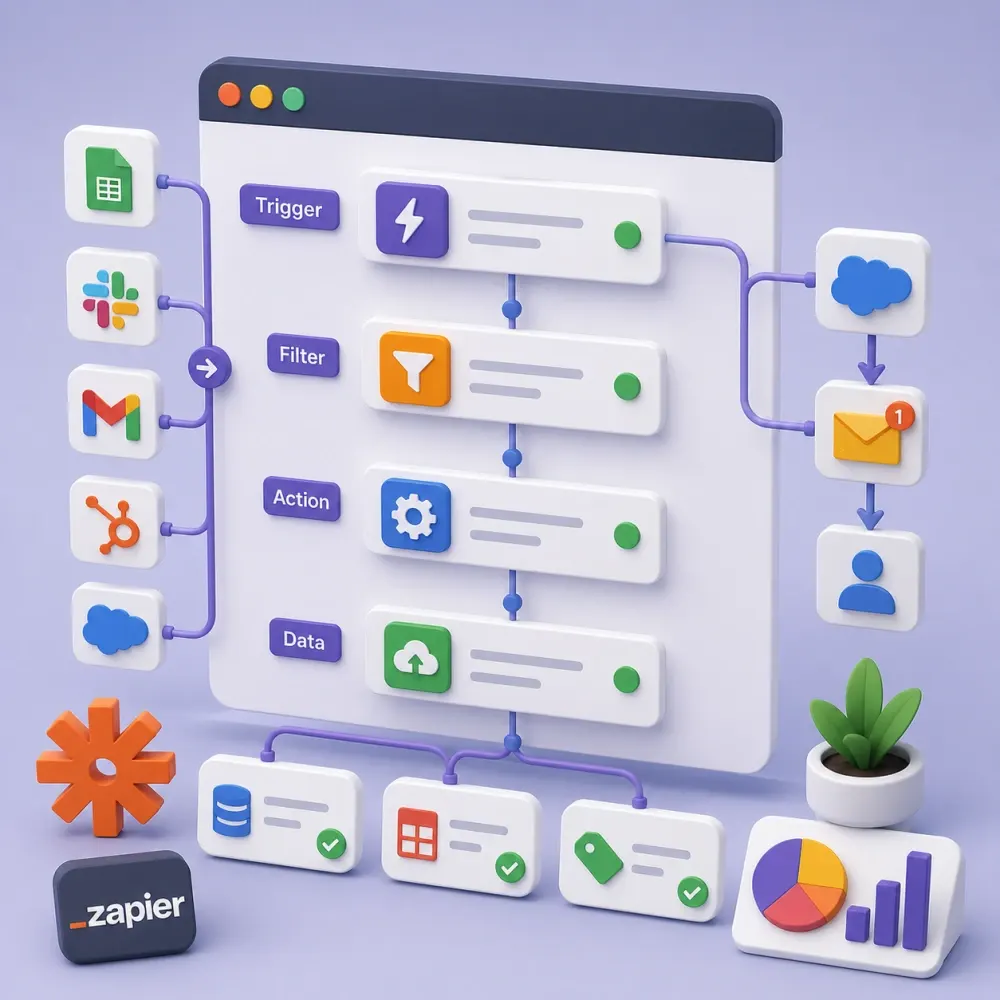
We map triggers, actions, data fields, handoffs, approvals and exceptions before building the Zap.
Connect the tools your team already uses and remove repetitive work from everyday operations. DesignBub plans, builds and tests Zapier workflows for lead management, CRM updates, sales, marketing, onboarding, ecommerce, reporting, alerts, webhooks and API-connected processes.
Practical Zapier automation built around the way your team, data and business tools already work.

























A business can lose a surprising amount of time to small repetitive tasks. A lead arrives and someone copies it into a CRM. A customer pays and another person creates a project. A form submission sits in an inbox until somebody forwards it. An order requires a spreadsheet update, a notification and a follow-up task. None of these jobs feels large, but together they create delays, duplicate work and avoidable mistakes.
DesignBub provides Zapier automation services for businesses that want their software tools to work together more effectively. We connect forms, CRMs, email platforms, spreadsheets, project tools, ecommerce systems, calendars, databases and other supported apps so routine information can move without constant manual copying.
We do not begin by adding as many Zaps as possible. We begin with the process. We identify the event that starts the workflow, the information that must move, the rules that decide what happens next and the points where a person still needs to make a decision. That approach keeps the automation useful, understandable and easier to maintain.
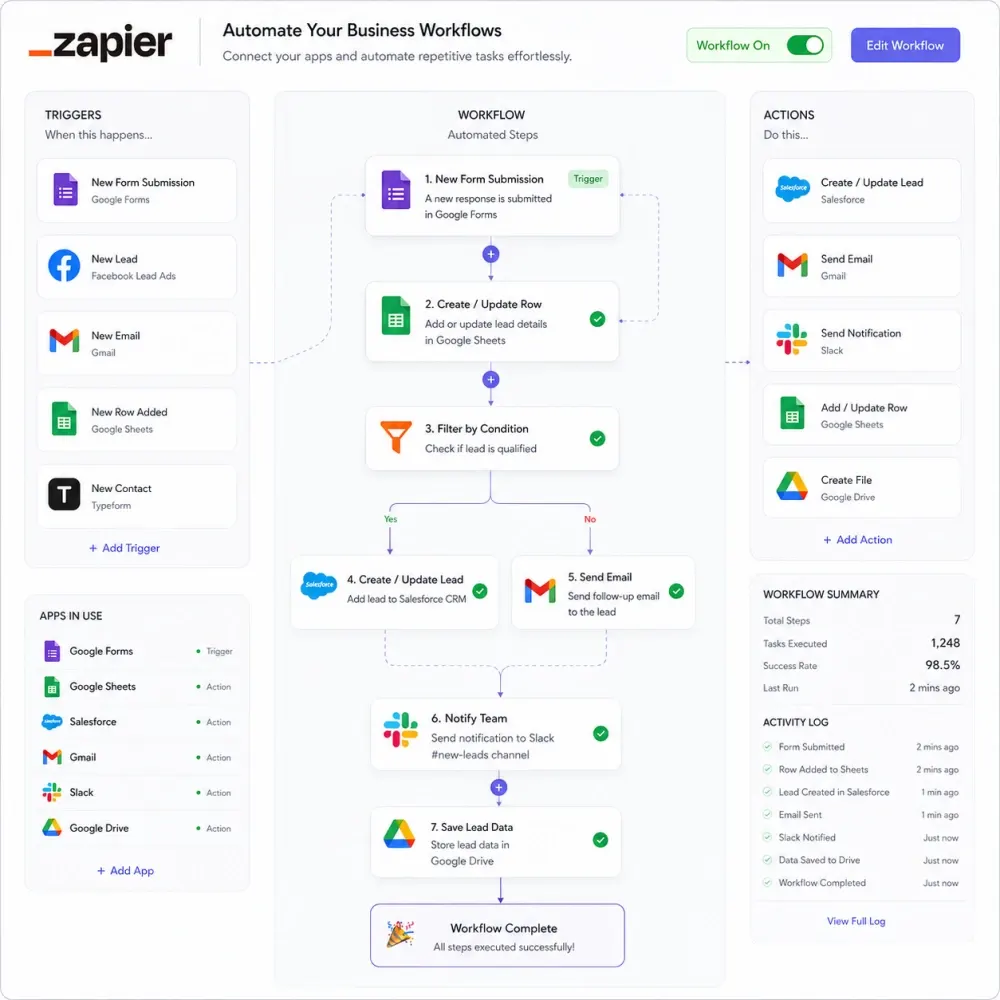
Zapier lets applications respond to events in other applications. A workflow normally starts with a trigger, such as a new website enquiry, a completed payment, a booked meeting, a changed CRM stage or a new database record. The Zap then performs one or more actions based on the instructions you define.
A simple Zap might take a new form submission and create a contact in your CRM. A more advanced workflow can clean the data, check conditions, choose a path, update several systems, create a task, send an internal alert and wait before the next action. The correct structure depends on the business process rather than the number of features available inside Zapier. Our Zapier automation services keep that structure focused on the outcome your team needs.
Professional Zapier integration services include more than connecting two app accounts. We review field mapping, permissions, duplicate handling, filters, branches, timing, test data, failure cases, webhooks and documentation. These details matter because an automation that runs successfully can still create poor results when it sends incomplete data to the wrong place.
We can automate one repeated task or connect several stages of a larger process. Each workflow starts with a clear business outcome.
We map triggers, actions, data fields, handoffs, approvals and exceptions before building the Zap.
Route enquiries, create or update contacts, assign owners and start follow-up steps without duplicate entry.
Connect lead sources, pipelines, email platforms, calendars, campaigns and internal sales notifications.
Turn a sale or payment into project setup, tasks, welcome communication and internal handoff actions.
Use structured requests when a standard Zapier action does not cover the operation your workflow needs.
Find broken mappings, outdated connections, duplicate logic and unnecessary steps in existing automations.
Small teams often feel manual work more strongly because the same person may handle sales, customer service, marketing and administration. Every repeated copy-and-paste task competes with work that needs real judgment. Zapier automation for small business can remove many of those repetitive handoffs without requiring a custom software platform.
You might start with one high-value workflow. Website enquiries can go directly into the right CRM pipeline. New customers can trigger an onboarding checklist. Booked calls can create follow-up activities. Paid invoices can notify delivery teams. New ecommerce customers can enter the correct email audience automatically.
Starting with one clear process also makes the result easier to measure. Your team can see whether the automation saves time and improves consistency before expanding the system. We can then add more workflows in stages instead of creating a complicated network of Zaps that nobody understands.
A useful business process rarely ends after one action. A new consultation request may need to create a CRM record, attach the lead source, notify the correct salesperson, create a follow-up task and send an approved confirmation. A paid order may need to update customer data, alert operations and create a project record.
Our custom Zapier automation work can use multiple actions as well as Filters, Paths, Formatter steps, searches, delays and other workflow logic when the process requires them. These tools let a Zap react differently to different records instead of treating every event as identical.
We keep the logic as simple as the business allows. A workflow with ten branches is not automatically better than one with two. Extra branches create more situations to test and more places to maintain later. We add conditional logic when it represents a real business rule and document the important decisions behind it.
A CRM only helps when the information inside it stays useful. Manual entry often creates missing fields, inconsistent formatting, duplicate contacts and forgotten follow-ups. Zapier CRM automation can connect your website, forms, booking tools, spreadsheets, email platforms, advertising sources and other systems with the sales process.
A new enquiry can create or update a contact, add the original source, assign an owner and create the next task. When a deal reaches an agreed stage, another workflow can start onboarding or notify operations. These actions reduce the need for employees to repeatedly move the same customer information between tools.
We also plan how existing records should behave. Before creating a new contact, the workflow may need to search for an existing one. Before changing a field, it may need to preserve a value your sales team already entered. These details protect data quality and help the CRM remain a reliable source of information.
Lead response slows down when enquiries arrive in several inboxes, forms or advertising platforms. A salesperson may not see the lead until someone checks the original source and forwards it. Zapier lead automation can organize that first handoff.
We can route leads according to the information already collected. Different services can notify different teams. High-value requests can trigger immediate alerts. Leads from a certain source can enter a dedicated pipeline. A booking can update the same contact rather than creating another record.
Automation should support qualification rather than pretend every lead has equal value. A salesperson may still need to review the enquiry, understand the customer and decide the next move. Zapier handles the repetitive preparation around that decision so the team can respond with the right context sooner.
Salespeople should spend their attention on prospects, not on copying records and reminding other departments what happened. Zapier sales automation can connect many of the routine activities that surround a deal.
A scheduled sales call can create an activity. A signed proposal can change a status and notify the team. A closed deal can create an onboarding task, project request, customer folder or billing handoff. A lost opportunity can enter a different follow-up workflow. The correct sequence depends on how your sales process is already defined.
We do not automate negotiation, qualification or relationship-building simply because software can send messages. Human judgment remains important. The automation focuses on consistent administration, timely internal communication and data movement so your team has less routine work after each sales event.
Marketing teams collect data from landing pages, lead forms, webinars, downloads, email platforms and campaigns. When each source creates a separate manual process, valuable information becomes difficult to follow. Zapier marketing automation services can connect those sources with the tools that need the data next.
A new subscriber can enter the correct audience with the right tag. A webinar registration can create or update a CRM contact. A qualified marketing lead can alert sales. A campaign response can record attribution information. An internal content request can create tasks for the marketing team.
We design these workflows around clear events rather than sending every contact everywhere. That keeps lists cleaner and reduces unnecessary actions. When several marketing tools need the same data, we also decide which application should own the primary record so the team does not create competing versions of the same customer.
The first hours after a customer buys can involve many small setup tasks. Someone creates the project, another employee sends instructions, a folder gets created, the delivery team needs a notification and the customer may need to complete an onboarding form.
Zapier customer onboarding automation can start when a payment succeeds, an agreement is signed, a deal reaches the correct CRM stage or another approved event occurs. The workflow can prepare internal records, create tasks, add customer details to connected tools and send approved communications.
Different services can follow different onboarding paths. We keep personal communication where it helps the relationship and automate the repeatable setup around it. This gives your team a more consistent starting point while reducing the risk that one important onboarding step gets missed during a busy week.
Online stores create a constant stream of events: orders, payments, refunds, customer records, stock changes and support requests. Teams often move this information into spreadsheets, CRMs, email platforms or project systems by hand.
Zapier ecommerce automation can connect suitable store events with the next operational step. A new order can notify a team, add the customer to an approved system or create a record for fulfillment. A high-value purchase can trigger a dedicated alert. A refund can update another business record when the connected applications support that action.
We test ecommerce workflows with care because they can affect real customers and financial records. Conditions should be explicit, and the automation should not assume that every transaction follows the same path. We also separate our implementation fee from the subscriptions or transaction charges of Zapier and the ecommerce tools themselves.
Forms often begin important business processes. They capture enquiries, applications, customer requests, registrations, support details and internal requests. The real work starts after the person clicks submit.
Our Zapier form automation service can take the submitted values and create records, notify team members, update a CRM, add a task, store selected information or start another approved workflow. We map each field carefully so names, emails, phone numbers, dates and selections arrive in the correct destination fields.
Email automation can support the same process. A form may send a confirmation, a completed milestone may trigger an approved update, or an internal event may alert the responsible team. We avoid automating messages that require personal judgment. The objective is to remove repeated administrative communication while protecting the conversations where a person should respond.
Many business records should not follow the same route. A lead requesting one service may need a different salesperson. An international order may require another process. A customer who already exists in the CRM should not always be treated like a brand-new contact.
Filters can stop a workflow when selected conditions are not met. Paths can send different records through different branches. Formatter steps can prepare information before another app receives it. Together, these tools allow Zapier workflow automation to represent practical business rules instead of running one identical sequence for every record.
We document important conditions and test more than the ideal example. A workflow needs to behave sensibly when fields are blank, a value arrives in an unexpected format or an existing record is found. Testing these cases early prevents simple exceptions from becoming daily manual cleanup later.
Standard integrations handle many common automation needs, but some workflows require a more customized exchange of data. A system may expose an API endpoint without providing the exact native Zapier action you need. Another service may send information through a webhook.
Our Zapier webhook and API integration work can send or receive structured requests where the project supports it. We review authentication, required fields, payload structure, expected responses and limits before relying on the connection in a live process.
API work introduces more dependencies than a simple native connection. An external service can change its endpoint, authentication or response format. For that reason, we keep notes on important assumptions and test the actual data flow. When a requirement becomes too specialized for Zapier, we will recommend a different technical approach rather than forcing the process into the platform.
AI can add value when a workflow needs to interpret information instead of only moving it. A step may classify an enquiry, summarize a long submission, extract structured details, prepare an internal draft or organize feedback before a person reviews it.
We build Zapier AI automation around a defined purpose. The workflow should know what information the AI receives, what output format is expected and what happens when the result is missing or uncertain. High-impact actions may still need human approval before the automation continues.
Adding an AI step can also introduce usage costs and variability. We therefore separate useful information-processing tasks from work that ordinary Zapier logic can handle more reliably. The simplest dependable method usually makes the automation easier to test, maintain and explain to the team that will use it.
Zaps can fail after a field changes, an app connection expires, a filter blocks unexpected values or test data stops matching real production records. Sometimes a Zap technically succeeds but creates the wrong data. Our Zapier troubleshooting services focus on finding the actual failure point.
We review triggers, actions, mappings, filters, paths, connected accounts, test records and workflow history. When the problem comes from the surrounding business process, we explain that instead of hiding it behind another automation step.
We can also review older Zapier workspaces for duplicated workflows, unclear names, unnecessary actions and automations that no longer serve a purpose. Simplifying the system can reduce maintenance and make future updates less risky. A clean automation setup should help the next person understand what is happening without reverse-engineering every Zap from scratch.
The strongest system is not the one with the most steps. It is the one that removes repetitive work while keeping data, ownership and exceptions understandable.
Move approved data between tools without asking employees to type the same information repeatedly.
Notify the correct person or create the next task as soon as the agreed event occurs.
Apply the same approved rules to routine actions instead of relying entirely on memory.
Use organized logic, testing and documentation so workflows remain easier to change later.
We build around the process first, then configure the automation.
We identify the current manual steps, apps, trigger, desired result and exceptions that matter.
We define actions, fields, conditions, searches, timing and ownership before the build begins.
We connect the approved apps and configure the required triggers, actions and workflow logic.
We test normal records and practical edge cases, then correct mapping or logic problems.
We activate the approved automation and provide the agreed notes, guidance and support period.
These are starting prices for defined Zapier implementation scopes. Your Zapier subscription, paid app plans, API usage and other third-party charges are separate.
Best for one focused automation that removes a clear repeated task between a few business tools.
For teams that need several connected workflows, conditional logic and a more complete business handoff.
For multi-app operations that need advanced branching, APIs, AI-assisted steps or several coordinated automations.
| Feature | Starter $460 | Business $1,190 | Advanced $3,970+ |
|---|---|---|---|
| Production workflows | 1 | Up to 3 | Up to 6 |
| Connected apps | Up to 3 | Up to 5 | Up to 8 |
| Multi-step automation | Basic | Included | Included |
| Filters / Formatter | Basic | Included | Included |
| Conditional Paths | — | Included | Advanced |
| CRM / lead routing | Basic | Included | Included |
| Webhook / API work | — | 1 webhook where suitable | Included |
| AI-assisted step | — | Optional add-on | 1 included |
| Testing | Core workflow | Core + edge cases | Extended scenarios |
| Documentation | Basic notes | Workflow documentation | Detailed documentation + training |
| Post-launch support | 7 days | 14 days | 30 days |
| Zapier subscription | Not included | Not included | Not included |
Additional simple workflowfrom $200
Extra app integrationfrom $100
Webhook / API integrationfrom $200
AI workflow stepfrom $200
Existing Zap repairfrom $150
Ongoing automation carefrom $250/month
Package limits describe the included implementation scope, not Zapier task limits. Final pricing can change when a workflow requires premium apps, complex API work, unusually high data volume, custom code, extensive migration or additional systems. We confirm the scope before work starts.
The cost of Zapier automation services depends on the workflow logic, not only the number of apps. A two-app workflow can still become complex when it needs duplicate checks, several searches, data transformations and conditional branches. A five-app process can sometimes remain straightforward when information follows one predictable route.
Important cost factors include the number of workflows, actions, Paths, integrations, webhooks, APIs, AI steps, data quality, testing requirements and the condition of any existing automations. Clear business rules usually reduce implementation time because the workflow does not need to solve unclear operational decisions.
Our service fee covers the agreed planning, build and testing scope. Zapier's own plan, task usage and third-party software subscriptions remain separate. We identify likely external requirements before implementation whenever the project makes them clear.
Businesses often search for a Zapier expert, Zapier consultant, automation specialist or Zapier developer when a workflow becomes more complicated than a simple trigger and action. Platform knowledge matters, but understanding the operation matters just as much.
A good automation specialist should ask where the original information comes from, which system owns the final record, what happens when data is missing, how duplicates should behave and who needs to know when something fails. Those questions prevent a technically successful Zap from creating operational problems.
DesignBub focuses on that practical layer. We build the agreed workflow, but we also make the logic readable enough for your team to understand the purpose. When another platform or custom development is a better fit, we will say so rather than creating an oversized Zapier solution.
Clear answers about Zapier automation services, integrations, pricing, subscriptions and ongoing support.
Common use cases include lead capture, CRM updates, sales notifications, customer onboarding, ecommerce handoffs, form processing, scheduled follow-ups, spreadsheet updates, project creation and other repetitive work between supported business applications.
Yes. We can build multi-step workflows and use conditions, searches, Filters, Formatter steps and Paths when the business process needs them. We keep the logic as simple as possible so the automation remains maintainable.
Usually, yes, when your CRM has a supported Zapier integration or a suitable API or webhook option. The exact workflow depends on the CRM actions, fields, permissions and the lead process you want to automate.
Yes. We can review triggers, mappings, conditions, connections and workflow history to locate unreliable steps. We can also simplify older Zaps when several automations now perform overlapping work.
No. Our packages cover the agreed automation planning, implementation and support. Zapier plans, task usage, premium third-party apps, API charges and other external subscriptions are paid separately by the client.
Yes, when the external service provides a suitable endpoint and the Zapier plan or available tools support the required method. API work needs additional review because authentication, payloads, limits and responses differ between services.
Yes. AI can help with tasks such as classification, extraction, summarization or draft preparation. We use it where interpretation adds value and define what should happen when the AI output is uncertain or incomplete.
A simple workflow can be completed much faster than a multi-app system with Paths, APIs and several exceptions. We estimate the schedule after reviewing the current process, connected apps and testing requirements.
Yes. The amount of documentation depends on the package. We can provide mapping notes, workflow explanations and a walkthrough so the team understands the important triggers, actions, conditions and dependencies.
Send the manual process you want to improve, the apps involved, the result you expect and examples of the data that moves between systems. We will also need suitable access to the Zapier workspace and connected test accounts when implementation begins.
Tell us which task repeats, which tools are involved and what should happen automatically. Our Zapier automation services can turn that handoff into a tested workflow. We can turn that process into a clear, tested Zapier workflow.