Catalog Starter
from$399
- Up to 12 pages
- Cover + contents structure
- 2 reusable page types
- Up to 3 revision rounds
- Print-ready + screen PDF
- Editable source file where applicable
DesignBub creates structured product catalogs, sales catalogs and digital PDF catalogs for businesses that need customers, distributors or sales teams to browse a large range without getting lost in inconsistent pages, product codes or specifications.

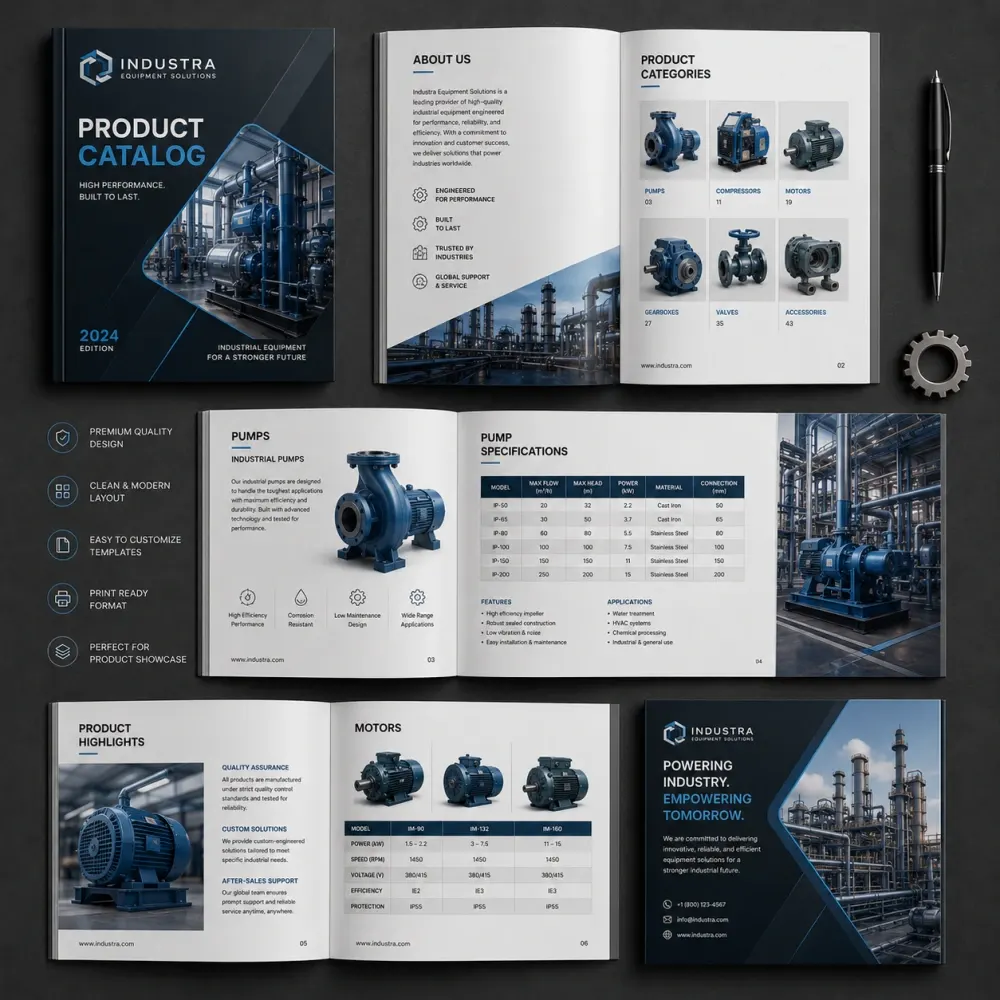
Product architecture, category pages, repeatable layouts, tables, navigation and files prepared for the real print or digital workflow.
A catalog can contain hundreds of useful products and still feel difficult to use. The problem is rarely the number of pages by itself. It is what happens when every image, product code, feature, price, specification and category competes for the same level of attention. The reader has to work too hard to understand where to start and how one item differs from another.
DesignBub provides catalog design services for manufacturers, distributors, retailers, wholesalers, ecommerce brands, furniture companies, fashion businesses, product suppliers and service organizations. We turn product data and imagery into a publication with repeatable rules, so the first category and the last category still feel like parts of the same system.
Before styling individual pages, we look at the range itself. How many categories are there? Which product fields repeat? Are there several sizes or models? Do buyers compare technical specifications? Will prices appear? Does the sales team need a downloadable PDF while the printer needs a separate production file? Those questions shape the catalog before decorative decisions begin.
Professional catalog design services can include catalog architecture, cover design, contents pages, category introductions, product grids, detailed product pages, typography, image placement, specification tables, icons, price treatments, index pages, clickable navigation and final file preparation.
The scope changes with the business. A furniture supplier may need large photography, dimensions and finish options. An industrial company may rely on model numbers and comparison tables. A wholesale catalog may prioritize SKUs, case quantities and prices. A fashion lookbook may need more editorial pacing and less dense product data. The visual system should respond to the buying situation instead of treating every catalog as the same multipage brochure.
We identify the components that repeat and design those components as a system. This makes the publication easier to browse and reduces the chance that later pages drift into different typography, spacing or product hierarchy.
A catalog for procurement teams does not behave like a fashion lookbook, and a wholesale price book does not need the same visual rhythm as a retail collection.
Organize product ranges with repeatable names, images, variants, codes, descriptions and specification areas.
Create screen-friendly documents with practical navigation, links and file sizes suited to sharing.
Prioritize SKUs, pack quantities, prices and related variants for buyers who need quick reference.
Structure model numbers, technical tables, dimensions and compatibility information without visual clutter.
Balance marketing imagery with product browsing for consumer-facing and online-supported ranges.
Rebuild an outdated or inconsistent catalog around a stronger page system and clearer navigation.
Create reusable master layouts for teams that expect regular product, price or edition updates.
Add useful internal navigation, product-page links and approved QR destinations where the format supports them.
Product catalogs are built around a range. Customers may move between several items before they decide which one fits their needs, so product pages need predictable relationships. A reader should not find dimensions at the top of one page, at the bottom of the next page and missing from the third because each spread was composed independently.
We define recurring fields such as product name, SKU, image, short description, dimensions, variants, materials, features and price. Not every field needs the same prominence, and not every catalog needs all of them. The page structure should reflect what buyers actually compare.
Category pages can introduce broader groups before the reader reaches individual products. This creates landmarks in a long publication and makes the catalog feel less like an uninterrupted sequence of inventory records.
A digital catalog may travel by email, WhatsApp, website download, cloud link or direct sales follow-up. Readers can open the same file on a laptop, tablet or phone, which means the page size, text scale and navigation need to make sense beyond one desktop monitor.
For a digital catalog design, we can prepare a screen-optimized PDF, clickable table of contents, internal links, website links and clear inquiry paths where required. File size also matters. A 150-page document filled with unnecessarily large images can become inconvenient to download or forward even if every page looks polished.
Interactive features are useful when they shorten a real task. They should not compensate for weak organization. A reader should still understand the product hierarchy before clicking anything.
Printed catalogs introduce constraints that do not exist in a digital file. Page size, binding, inner margins, paper stock, page count, bleed, image resolution and finishing can all affect the layout. A thick perfect-bound catalog may need different inner spacing from a short saddle-stitched booklet.
We prepare print artwork around confirmed production specifications rather than assuming every printer uses the same setup. Where a vendor provides a template, spine calculation or special-finish requirement, that information should be supplied before final export.
A screen proof remains useful for reviewing content and visual direction, but physical production can reveal paper, color and binding behavior that a monitor cannot reproduce exactly. For important print runs, a vendor proof is still a practical step.
Wholesale buyers often need fast access to codes, pack sizes, quantities, variants and prices. Industrial buyers may need model numbers, capacities, compatibility, dimensions or technical specifications. These readers are not helped by a decorative layout that makes operational information difficult to locate.
Wholesale catalog design uses repeatable information zones so related products can be compared quickly. Industrial catalog design often depends on well-structured tables, restrained typography and clear category labels. The catalog can still feel branded without turning technical information into decoration.
Product claims, measurements, engineering information and technical specifications must come from approved client data. We organize that information visually; we do not certify the accuracy of engineering, safety or performance claims.
Retail catalogs usually carry a larger marketing role. Collection imagery, featured products and editorial spreads can create interest before denser product pages begin. The challenge is making the promotional pages and the practical pages feel like one publication.
An ecommerce business may already have a website but still need a downloadable product catalog for distributors, trade buyers, sales representatives or customers who prefer a portable document. Categories can follow familiar website logic, while links can connect readers back to current online product pages.
Where prices or stock change often, it may be better to keep high-change information online and let the catalog focus on stable product attributes. The right approach depends on how frequently the document will be updated.
Furniture catalog design often combines lifestyle photography with dimensions, finishes and product codes. A collection spread can establish context while later pages provide exact buying information. Fashion catalogs may place more weight on editorial imagery, seasonal pacing and collection structure, with product details integrated more quietly.
Beauty and cosmetic ranges can contain products that look visually similar but differ by shade, formulation or purpose. Clear variant treatment becomes important. Food and beverage catalogs often need appetite appeal while still keeping sizes, flavors, packaging formats and ordering details easy to identify.
The page system should acknowledge those differences instead of forcing an industrial specification grid onto every category. Consistency comes from shared design rules, not from making every product page physically identical.
A catalog layout system defines margins, columns, image zones, product blocks, headings, page numbers and recurring data areas. It should create familiarity without becoming rigid. One category may show two large products per page while another may need six smaller items. Some products may require technical tables while others need only a photograph and brief description.
We create rules that can absorb those differences. This is especially important in long documents because small inconsistencies become more visible through repetition. A heading that moves on every page or a specification table that changes column logic slows the reader down.
Catalog typography follows the same principle. Category headings, product names, codes, descriptions, specifications and captions should each have recognizable roles. Once the reader learns the visual language, the next page should feel easier to use rather than introducing a new system.
Large catalog projects are easier when the source information is structured. A spreadsheet can separate product name, SKU, description, dimensions, materials, variants, pack quantity and price into consistent fields. That makes it easier to see where information is missing or where the same field is described in several different ways.
We may recommend standardizing presentation before hundreds of pages are populated. That does not mean changing technical facts. It means deciding, for example, whether dimensions always appear in the same unit order or whether every product uses the same label for material information.
Good data preparation can prevent more production errors than trying to solve inconsistent source material one page at a time.
Category logic should reflect how customers search the range, not only how the inventory system is organized internally. Categories may be based on product type, application, collection, material, audience or another business-specific structure.
A table of contents gives the reader an overview. Category divider pages create landmarks. Page headers can show the current section. Larger technical catalogs may also need a product or SKU index at the end. Digital versions can link those navigation elements to relevant pages.
Navigation is most useful when it removes effort. Adding tabs, icons or colors that do not correspond to a clear structure can make the publication busier without making it easier to use.
Some catalogs show prices and some intentionally leave them out. When pricing is included, its position and formatting should stay consistent across the range. Wholesale catalogs may also need case pricing, minimum quantities or several commercial tiers.
Product codes deserve similar care. A visually attractive page becomes operationally risky if the photograph, SKU and specification block are mismatched. For large ranges, we recommend a structured source file and a client-side data check before release.
DesignBub presents the approved data supplied for the project. Pricing strategy, inventory status and product-data accuracy remain business decisions for the client.
A business with dozens or hundreds of products benefits from templates that handle normal variation. One item may have a two-line name while another has five variants. Some categories may contain short descriptions and others may require tables. The design should not collapse whenever the content is slightly less convenient than the first sample product.
We test master layouts against several realistic examples before the catalog is fully populated. That helps reveal where a system needs more flexibility and reduces the amount of redesign required later.
A scalable approach also makes new editions easier because new products can join an established visual structure instead of forcing another redesign from the beginning.
Translations rarely occupy exactly the same amount of space as the source text. A short English product heading can become much longer in another language, while some scripts require different typefaces or reading directions.
Multilingual catalog design should therefore be planned around all required languages before the templates are treated as final. We can structure bilingual or multilingual layouts, but the translation itself should be supplied or reviewed by an appropriate language resource.
Where the catalog is distributed across different markets, separate language editions can sometimes provide a cleaner result than placing every language on every page. The right solution depends on the audience and production plan.
Older catalogs often become inconsistent gradually. New products are added using slightly different layouts, old images remain beside newer photography, page headings drift and category logic stops matching the current range.
Catalog redesign services can keep useful product information while rebuilding the page architecture, typography, image rules and navigation. We review what still works before changing the visual language. If customers already recognize certain collection or category cues, there may be value in preserving them.
For large catalogs, redesign is most efficient when a representative set of pages is approved first. Rebuilding every page before agreeing on the new system creates unnecessary revision work.
An editable template can define cover options, category dividers, product grids, detailed pages, comparison tables and standard typography. The template should be flexible enough to handle realistic variations rather than only the exact content used during setup.
We can prepare source files in the agreed design software and organize styles so future editions are easier to maintain. The right workflow depends on who will make updates. A marketing designer may be comfortable with a professional layout application, while a sales team may need a simpler editing process.
Template delivery does not remove the need for content checks. Prices, codes and specifications still need business review whenever an edition changes.
We separate structure, visual direction and large-scale population so major decisions are not repeated across dozens of pages.
We review categories, product count, fields, photography, existing files and required outputs.
We map page types, category order, contents logic and the information that repeats.
Representative pages establish typography, grids, product cards, tables and image treatment.
Approved product data is flowed into the system and unusual items are handled deliberately.
Corrections are applied and print or digital files are prepared for the agreed workflow.
A project can include product catalog design, business catalogs, wholesale catalogs, retail catalogs, digital catalogs, print catalogs, PDF catalogs, sales catalogs, technical catalogs, industrial catalogs, fashion lookbooks, furniture catalogs, food catalogs, cosmetic catalogs and ecommerce product catalogs.
Deliverables can also include cover design, contents pages, category introductions, product grids, technical tables, specification treatments, SKU presentation, index design, clickable navigation, QR-code placement, catalog templates, alternate screen versions and print-ready production files.
Page count is only one pricing factor. A repetitive 40-page catalog may require less design work than a shorter publication where every page type is different. Product-data consistency, image condition, number of categories and amount of custom visual work can all change the scope.
A long publication exposes weak rules. If product codes move around, table styles change, image crops become inconsistent and category headings gradually lose hierarchy, the reader feels the disorder even if individual spreads are attractive.
DesignBub approaches catalog design services with the full range in view. We decide what repeats, what changes and how buyers move between categories before the layout expands to dozens of pages. That creates a more stable foundation for both the first edition and later updates.
We also separate what design can improve from what it cannot guarantee. Clear structure can make product information easier to browse and compare. It cannot promise sales, distributor orders or business growth. Those outcomes depend on the products, pricing, audience, distribution and wider sales process.
These are starting USD prices for organized content and supplied product assets. Final quotes depend on page count, unique page types, product volume, data condition, image work, languages and output requirements.
Useful when you already have a catalog system or need one specific deliverable.
Pricing note: printing, shipping, paid stock assets, professional product photography, advanced retouching, 3D rendering, copywriting, translation, data entry from unstructured source material, specialist technical review and third-party digital catalog platform fees are separate unless explicitly included. Catalogs above 48 pages, very large SKU ranges and complex data-driven publications are quoted after reviewing the source material.
Scope, product data, print files, digital versions, updates and pricing all become easier to plan before the page system is populated.
Catalog design services cover the planning and visual production of multi-page product or service publications. Work can include covers, category pages, product grids, specification layouts, contents pages, indexes, digital navigation and print-ready files.
Yes. We design product catalogs for focused collections as well as multi-category ranges with repeated product data, variants, specifications and SKUs.
Yes. Digital catalog projects can include a screen-optimized PDF, clickable contents, internal navigation and approved product or inquiry links.
Yes. Print files can be prepared to the confirmed page size, bleed, binding and printer specifications supplied for the project.
Yes. Wholesale catalogs can prioritize codes, quantities, prices, variants and other information that trade buyers need to reference quickly.
Yes. We can organize approved model numbers, dimensions, tables and technical specifications. The client remains responsible for verifying technical accuracy.
Yes. Large ranges need a clear data structure, category plan and scalable page system. We quote high-volume projects after reviewing the product count and source data.
For large ranges, a structured spreadsheet is often the most practical source because product fields can be matched consistently to the page system.
Yes. Client-approved prices can be placed using one consistent treatment. The business remains responsible for pricing accuracy and future changes.
Yes. Digital PDF catalogs can include approved links to website product pages, forms, email addresses or other destinations.
Yes. Supplied and tested QR codes can be integrated where they help readers move from the catalog to a useful online destination.
Yes. We can retain approved product information while rebuilding category logic, page templates, typography, image treatment and navigation.
Editable source files are included in the packages where stated. Reusable templates can also be created for teams that manage frequent updates.
Yes. A second-language adaptation can be designed, but translation accuracy should be supplied or reviewed by a qualified language resource.
Light content cleanup can be agreed, while full product copywriting, technical writing or research is quoted separately.
Client-supplied images can be used. Professional photography, large-scale clipping, advanced retouching or 3D rendering is separate unless included in the scope.
DesignBub catalog packages currently start at $399 for up to 12 pages, $749 for up to 24 pages and $1,299 for up to 48 pages. Larger or more complex ranges are quoted after reviewing the source files.
Page count, number of unique layouts, product volume, image condition, technical tables, languages, interactivity and the condition of the supplied data can all affect the final quote.
Timing depends on page count, product-data readiness, image quality, number of page types and the speed of review. We confirm the schedule after seeing the real content.
The standard scope focuses on design and production-ready files. Physical printing, freight and delivery are separate unless specifically arranged.
A long catalog does not need to feel long. When categories are clear, product pages are predictable and information appears where readers expect it, even a large range can feel manageable.
The cover creates the first expectation. Contents pages provide direction. Category pages create landmarks. Product grids support comparison. Detailed pages hold the information required for a decision. An index helps readers return to the exact item they need.
DesignBub provides catalog design services for businesses that need those parts to work as one publication. You can start with an old PDF, a spreadsheet, folders of product images, individual product sheets or an ecommerce range that needs to become a portable sales document.
The goal is not to make people notice how many pages the catalog contains. It is to help them find the right product without thinking about how much effort the document required to navigate.
The page focuses on commercial catalog work rather than repeating one keyword in every paragraph.
Send the product count, categories, sample data, images and expected page range. We can recommend the right page system and confirm the project scope before production begins.